Ordering the strokes
Fifth Katana post. We have perimeters, we have infill. What we don’t have is order. A 3D printer is simply a CNC (computer numerical control) machine that slides a nozzle through space depositing something (usually plastic) until a structure emerges. We’re going to build a
plannerthat will decide how the toolpath shall move, this will later be used to produce our GCODE (the raw commands we send to the controller).
This is the first piece of Katana that’s purely algorithmic, because it doesn’t touch the mesh, the offsetting library, or the renderer (at least directly), it just reorders things. But it’s also where the output starts looking like something a printer could conceivably follow.
The move abstraction
Everything the nozzle does, in Katana’s world, is a Move:
pub enum MoveKind {
    Travel,         // no extrusion
    Perimeter,      // a closed perimeter loop
    Infill,         // a single infill line segment
    SurfaceInfill,  // solid top/bottom layers (future)
}

pub struct Move {
    pub kind: MoveKind,
    pub points: Vec<Point2<f32>>,
}

pub struct PlannedLayer {
    pub z: f32,
    pub layer_index: usize,
    pub moves: Vec<Move>,
}
The planner should take take the ToolpathResult (essentially a Vec<ToolpathLayer>) and produce a PlannedResult - the same data, but ordered, with Travel moves inserted wherever the nozzle has to jump between features. Layers stay independent, so the whole thing gets to ride rayon again.
The simplest way to figure this out is to use the nearest-neighbor. We need to do this in three nested levels:
- Which perimeter set to visit next? For layers with multiple shapes, start at the current nozzle position and walk to the closest set.
- Within a set, which disjoint loop at each perimeter level? When a shape has pinched into multiple loops, visit them closest-first.
- Within a loop, where to start the loop? A perimeter is a closed polygon, so you can start anywhere on it. Rotate the point list so the point closest to the current position is at index 0 (if this rotation didn’t happen, the nozzle would teleport to some arbitrary corner of every loop, every time).
rotate_to_nearest(&mut points, ¤t_pos);
let loop_start = points[0];
if !points_equal(¤t_pos, &loop_start) {
moves.push(Move {
kind: MoveKind::Travel,
points: vec![current_pos, loop_start],
});
}
moves.push(Move { kind: MoveKind::Perimeter, points });
current_pos = loop_start; // loop closes back where it started
Skip the travel between walls in the same set
Inside one perimeter set (outer wall + inner walls of a single shape), consecutive perimeter levels sit one nozzle-width apart. That’s really close, so we don’t need to travel, we can just connect the perimeters.
let mut inside_pset = false;
// ...
if !points_equal(¤t_pos, &loop_start) {
if inside_pset {
// Same perimeter set - connect with extrusion, not a travel
moves.push(Move {
kind: MoveKind::Perimeter,
points: vec![current_pos, loop_start],
});
} else {
// First wall in this set - real travel move
moves.push(Move {
kind: MoveKind::Travel,
points: vec![current_pos, loop_start],
});
}
}
inside_pset = true;
Edge case! Shapes with nearly-horizontal top or bottom surfaces print can’t have a normal perimeter count. In the top layers of a sphere, some circle slices are much larger than the ones sitting on top of it, so a fixes number of perimeter walls might not be enough to cover the infill part. This marvelous art illustrates it:
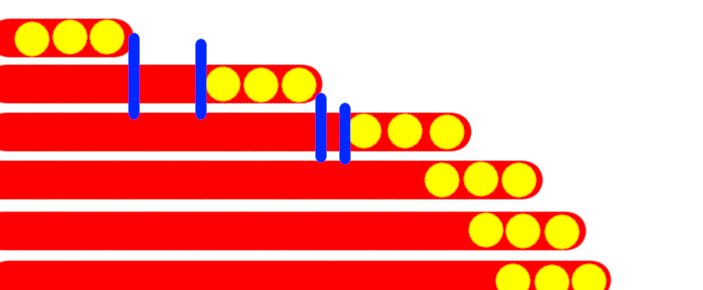
My solution to fix this was to calculate the min_surface_angle between a layer and the top and bottom layers, and based on that, create additional perimeter layers, depending on such angle. It’s not perfect, but it’s good enough for now.
Next steps
We now have properly ordered moves with correct[-ish] travel insertion. That means we can finally render the filament in 3D the way a real slicer preview does: fat, round* beads following each extrusion, travel moves as thin dashed lines. Which also means I have to solve something I’ve been avoiding for weeks: how do you render a million tubes at once without everything catching fire? Next post!
*= I was to find out later that a deposited plastic filament isn’t actually round, but closer to a rhombus that’s more thick than tall.